Premier Trade Exchange | Platform Applications
Connected Operating System
10 Connected Operating System
The Trade Exchange platform replaces fragmented spreadsheets, disconnected software and manual follow-up with a coordinated operating environment. Every major stage—from attracting and qualifying applicants to completing transactions, reconciling payments and serving active members—is managed through a dedicated application built for that responsibility.
10 Specialized
Applications
Applications
Shared Records
& Permissions
& Permissions
End-to-End
Lifecycle
Lifecycle
Role-Based
Workflows
Workflows
Connected operating systemTE
OS CoreOne source of truth
OS CoreOne source of truth
Live pipeline$1.24BIllustrative interface data
System status● LIVEAll modules operational
Active records3,284Role-controlled visibility
Platform architecture
A Connected Operating Chain, Not Disconnected Tools
Every approved record, decision and obligation moves forward without losing the evidence, accountability or context behind it. TE OS Core supplies shared identities, permissions and system controls so each specialized application can perform its responsibility inside one operating standard.
Explore the architecture01AttractCapture qualified interest
02VerifyConfirm evidence
03ActivateContract and enable
04CommitStructure obligations
05MatchConnect demand and supply
06ExecuteDeliver and close
07ReconcileSettle and record
08ServeSupport and progress
TE
OS CoreSECURE • UNIFIED • CONNECTED
OS CoreSECURE • UNIFIED • CONNECTED
TE ApplicationsLead capture
TE VerificationDue diligence
TE OnboardingDocuments
TE SchedulesBuying and selling commitments
TE MatchingDemand-and-supply matching
TE TransactionsExecution
TE FinanceFees
TE Member PortalMember self-service
Platform suite
The Ten Platform Applications
Each application has its own dashboard, workflows, permissions, reporting and activity history. Together, they form one controlled operating chain.
01
TE OS Core
Shared records, permissions, modules and platform administration
Operating System and Administration Hub
02
TE Applications
Lead capture, applicant qualification, scoring and review
Lead and Application Management
03
TE Verification
Due diligence, evidence, inspections, scoring and decisions
Due Diligence, Scoring and Decision Management
04
TE Onboarding
Documents, contracts, signatures and member activation
Contracts, Signatures and Member Activation
05
TE Schedules
Buying and selling commitments, fulfillment and performance
Buying and Selling Commitment Management
06
TE Matching
Demand-and-supply matching, opportunities and introductions
Buyer, Supplier and Opportunity Matching Engine
07
TE Transactions
Execution, confirmations, delivery, disputes and closeout
Transaction Execution and Closeout Management
08
TE Finance
Fees, invoices, payments, seller releases and reconciliation
Fees, Invoicing, Payments and Reconciliation
09
TE Multiplier
Member progression, allocation, reservations and controls
Progression and Selling-Allocation Management
10
TE Member Portal
Member self-service, actions, documents and account access
Member Self-Service and Account Access
Exchange lifecycle
From Inquiry to Active Member to Completed Transaction
Attract & Qualify
TE ApplicationsCapture interest, qualify applicants and score opportunities for disciplined review.
Verify & Decide
TE VerificationComplete due diligence, record evidence and issue controlled approval decisions.
Onboard & Activate
TE OnboardingExecute agreements, complete setup and activate properly documented members.
Commit & Match
TE Schedules + MatchingStructure commitments, identify strong counterparties and control introductions.
Execute & Close
TE Transactions + FinanceConfirm terms, manage delivery, settle fees and reconcile every financial record.
Grow & Serve
TE Multiplier + Member PortalControl progression and allocation while giving members one secure account view.
Command center
Operational Visibility Across the Entire Exchange
Volume by CategoryLast 30 Days
Transaction StatusLive workflow states
982
Completed 42%In progress 26%Pending 16%Review 10%Other 6%
Transactions Over TimeLast 30 Days
Recent ActivityAppend-only event history
| TIME | ACTIVITY | MEMBER | TYPE | VALUE | STATUS |
|---|---|---|---|---|---|
| 2 min ago | Transaction executed | Global Energy Partners | Energy | $25.4M | Completed |
| 8 min ago | New match created | InfraBuild Solutions | Infrastructure | $18.7M | Matched |
| 15 min ago | Verification approved | TradeConnect Capital | Finance | — | Verified |
| 22 min ago | Schedule published | Commodity Alliance | Commodities | $12.3M | Scheduled |
Member experience
One Secure Member View
Members see balances, obligations, opportunities, transactions, payments and required actions in one secure account environment. The view shown here comes directly from the user-account area of the attached theme and has been cropped to focus only on the interface itself.
- ◎Actual account viewUses the real interface from the attached theme rather than a fictional mockup.
- ▣Clean cropped displayBrowser chrome, open tabs and lower tables have been removed for a cleaner presentation.
- ↗Key operational dataShows summary cards, status blocks and dashboard charts in one view.
- ✓User-account contextThe screenshot displays the theme’s user account view, including the secure account navigation.
Actual User Account DashboardAttached theme • interface showcase
Secure member view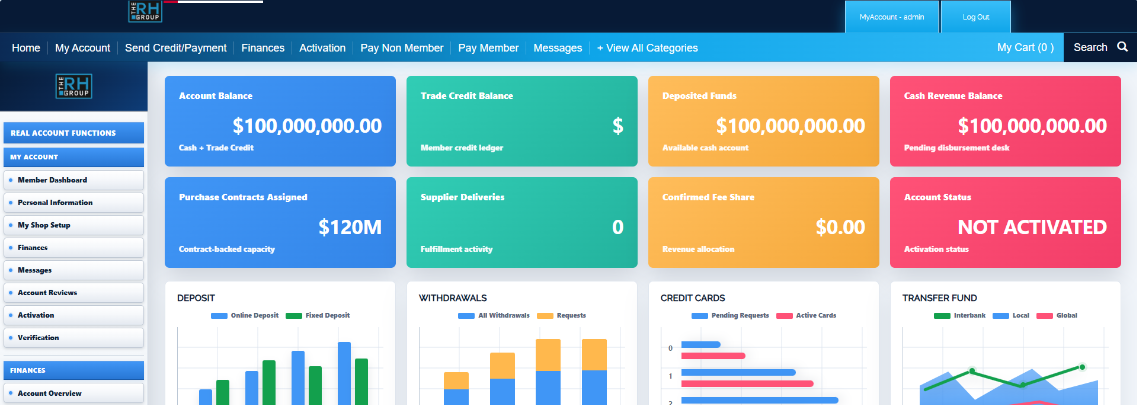
Complete application detail
Explore Every Application and Capability
The full supplied platform content is retained below. Open any application to review its operating purpose, outcomes and complete capability set.
01 TE OS CoreOperating System and Administration HubThe shared operational backbone that keeps the entire Trade Exchange organized, controlled and connected. 10 capabilities+
TE OS Core is the central administrative foundation of the Trade Exchange platform. It maintains the master records, permissions and shared services used across the operating environment, giving authorized personnel one reliable place to manage companies, contacts, members, users, documents, notifications and system activity.
Instead of allowing each application to operate as an isolated tool, OS Core provides the common structure that allows specialized modules to work from consistent identities, roles, classifications and operational records. Its event, module and integration controls also provide visibility into how information moves across the platform.
TE OS CoreINTERFACE PREVIEW
Core capabilities
- 01
Central company, contact, member and user directories with create, edit, archive, restore and search controls.
- 02
Role-based access control with configurable roles, capabilities and administrative permissions.
- 03
Module registry for viewing, registering and monitoring the applications that make up the Trade Exchange platform.
- 04
Event monitor for tracking, publishing and replaying operational events exchanged between modules.
- 05
Notification center for creating, distributing and managing platform-wide alerts and updates.
- 06
Append-only activity logs that create a clear record of important actions across the operating system.
- 07
Document center for storing, reviewing, organizing and controlling access to shared records and files.
- 08
Categories and classification management for maintaining consistent industries, products, services and operating classifications.
- 09
Global search across companies, contacts, members, users, documents, events and other Core records.
- 10
Import, export, backup, restore, system-health and developer-integration tools for platform administration.
02 TE ApplicationsLead and Application ManagementTurn inquiries, referrals and prospects into properly reviewed, scored and qualified Trade Exchange applicants. 10 capabilities+
TE Applications manages the complete front end of the applicant journey—from first contact and lead capture to application review, classification, approval and handoff. It gives the exchange a structured system for deciding who should advance rather than relying on scattered emails, spreadsheets or subjective judgment.
Each application can be measured against defined qualification criteria, including company proof, decision-maker access, category fit, supply capacity, buying and selling readiness, supporting documents, activation readiness, strategic value and responsiveness. Reviewers can see missing information, red flags, scoring results and required next actions from one workspace.
TE ApplicationsINTERFACE PREVIEW
Core capabilities
- 01
Lead capture and pipeline management by source, campaign, country, industry, category and current status.
- 02
Structured application intake with company, contact, ownership, capacity, readiness and supporting-document information.
- 03
Configurable scoring categories, score thresholds and applicant classifications for consistent qualification decisions.
- 04
Review queues for new, unassigned, awaiting-review, information-requested and resubmitted applications.
- 05
Reviewer assignment, status history, red-flag recording and documented approval or rejection decisions.
- 06
Referral submission and conversion tracking for brokers, associations, consultants and channel partners.
- 07
Reactivation workflows for inactive or previously deferred prospects that may now be ready to proceed.
- 08
Written communications, follow-up scheduling and correspondence history attached to the relevant applicant record.
- 09
Controlled handoffs to TE Verification and TE Onboarding when an applicant reaches the required stage.
- 10
Operational and executive reporting on lead conversion, scoring, classifications, approvals, red flags, reviewer performance and handoffs.
03 TE VerificationDue Diligence, Scoring and Decision ManagementVerify applicants, document the evidence and make approval decisions through a transparent, controlled process. 11 capabilities+
TE Verification is the exchange’s due-diligence and approval workspace. It converts an approved application into a structured verification case where documents, questionnaires, findings, inspections, scoring and management reviews can be completed before the applicant is cleared for onboarding.
The application separates evidence from opinion. Reviewers can record what was submitted, what was confirmed, what remains unresolved and how every finding affects the final outcome. Critical red flags, required inspections and approval conditions remain visible so that a numerical score never hides a material risk.
TE VerificationINTERFACE PREVIEW
Core capabilities
- 01
Verification case creation, assignment queues and workload management for reviewers and verification officers.
- 02
Cross-case document review with requirement status, review outcomes and missing-document visibility.
- 03
Written questionnaires for collecting additional information and recording applicant responses.
- 04
Findings center for documenting verified facts, exceptions, weaknesses and evidence from each review source.
- 05
Red-flag center with severity, deductions, blocking status and escalation controls.
- 06
Transparent scoring engine with configurable category weights and recommended decision ranges.
- 07
Inspection management with schedules, reusable checklist templates, weighted items, outcomes and locked completion records.
- 08
Quality-control queue for second-reviewer and management review before final decisions are issued.
- 09
Decision center for Verified, Conditionally Verified, Pending, Failed and management-review outcomes.
- 10
Conditional verification, escalation, periodic reverification and controlled handoff to onboarding or other modules.
- 11
Twenty operational and executive reports covering status, outcomes, documents, scores, red flags, inspections, readiness, reviewer performance and expiration.
04 TE OnboardingContracts, Signatures and Member ActivationMove verified companies from approval to signed agreements, completed setup and active membership. 11 capabilities+
TE Onboarding manages the controlled transition from verified applicant to activated Trade Exchange member. It brings onboarding cases, checklists, required documents, contract preparation, electronic signatures, activation rules and operational handoffs into one coordinated workflow.
Every case can be followed through a detailed stage sequence, with clear ownership, required actions and an append-only history. This helps the exchange prevent premature activation, missing documentation, unsigned agreements or unclear account responsibility.
TE OnboardingINTERFACE PREVIEW
Core capabilities
- 01
Executive onboarding dashboard showing case status, activation paths, contract status, country distribution and officer workload.
- 02
Detailed onboarding cases with a 19-stage workflow, status history, quick actions and account-manager assignment.
- 03
Checklist center with a comprehensive default onboarding template and configurable required items.
- 04
Document collection for company records, authorized signatory information, activation-path evidence and supporting materials.
- 05
Contract hub with reusable templates, clause library, drafting, version history, internal review, amendments and version comparison.
- 06
Signature center with signer management, electronic signature workflow and signature-evidence records.
- 07
Activation eligibility engine that checks whether documents, agreements, signatures and other requirements have been completed.
- 08
Activation center for reviewing eligible cases, recording decisions and moving approved members into active status.
- 09
Operations and lifecycle controls for transaction handoffs, escalations, contract amendments, renewals and expirations.
- 10
Member-facing onboarding view showing next actions, notifications, status, documents and company information.
- 11
Twenty reports covering onboarding progress, stage duration, documents, contracts, signatures, activation, assignments, delays and officer performance.
05 TE SchedulesBuying and Selling Commitment ManagementConvert member intentions into structured buying and selling commitments that can be activated, measured and enforced. 11 capabilities+
TE Schedules manages the operational commitments that drive activity inside the exchange. It allows buying and selling schedules to be defined with line items, timing, quantities and recurring obligations, then reviewed and activated only when the required rules have been satisfied.
Once a schedule is active, the application tracks what the member committed to do, what has been fulfilled, what remains outstanding and whether performance is declining. Amendments, suspensions, warnings, corrective actions and freeze recommendations are handled through controlled workflows rather than informal changes.
TE SchedulesINTERFACE PREVIEW
Core capabilities
- 01
Buying and selling schedule creation with structured line items, categories, values, quantities, dates and commitment terms.
- 02
Dedicated review queues for evaluating schedules before activation.
- 03
Configurable activation rules engine for checking eligibility and approving schedules for operation.
- 04
Recurring obligation calendar showing monthly buying and selling commitment periods across active schedules.
- 05
Fulfillment center that credits authoritative transaction activity against the correct obligations.
- 06
Manual fulfillment entries and adjustments with a visible audit trail when authorized intervention is required.
- 07
Controlled amendments, versioning, suspensions and schedule holds without overwriting the original commitment history.
- 08
Configurable 0–100 performance scoring for members and schedules based on fulfillment and operating behavior.
- 09
Warning levels, non-performance cases, corrective-action plans, milestones and supporting evidence.
- 10
Freeze recommendations published to TE Multiplier when schedule performance requires allocation action.
- 11
Twenty reports covering status, fulfillment, obligations, credited volume, performance, amendments, warnings, corrective actions, categories, countries and activation paths.
06 TE MatchingBuyer, Supplier and Opportunity Matching EngineIdentify the strongest trade opportunities and move them through a controlled path from match to transaction. 12 capabilities+
TE Matching connects active buyer demand with qualified supplier capacity. The application can evaluate potential combinations automatically or allow authorized staff to build a match manually, while still applying the same eligibility checks, blockers and scoring logic.
Matching goes beyond placing two names together. Each candidate is assessed for category, specifications, quantity, capacity, value, geography, delivery, timing, quality, compliance, payment terms, readiness and available selling allocation. Strong candidates can then progress through approval, private opportunity management, controlled introduction and mutual confirmation.
TE MatchingINTERFACE PREVIEW
Core capabilities
- 01
Executive dashboard for monitoring active demand, active supply, score levels, opportunity stages, categories and pipeline value.
- 02
Automatic matching engine that evaluates eligible buying and selling records and generates scored candidates.
- 03
Manual match creator that allows staff to select demand and supply while preserving system eligibility and scoring checks.
- 04
Deterministic score breakdown across ten operating criteria, with configurable weights and quality thresholds.
- 05
Eligibility screening and blocker detection before a match can advance to review or approval.
- 06
Split-match builder for allocating one buying requirement across multiple suppliers while validating remaining capacity.
- 07
Review queue, approved-match center and append-only status history for each matching decision.
- 08
Private opportunity pipeline with buyer and supplier views, controlled stages and staff-managed progression.
- 09
Introduction control center that prevents counterparty identity from being disclosed before authorization.
- 10
Written communications, templates, confirmations and task management without requiring telephone calls.
- 11
Allocation-reservation requests sent to TE Multiplier and locked transaction handoffs sent to TE Transactions.
- 12
Escalation, outcome tracking and twenty reports covering match quality, responses, pipeline value, reservations, conversion, capacity gaps and policy performance.
07 TE TransactionsTransaction Execution and Closeout ManagementManage every approved trade from confirmed terms and required documents through delivery, acceptance and closeout. 12 capabilities+
TE Transactions receives approved opportunities from the matching process and turns them into controlled transaction files. It gives coordinators, buyers, suppliers and authorized reviewers one structured workspace for confirmations, documents, delivery activity, payment visibility, issues, disputes and completion.
The application preserves the confirmed commercial terms while allowing properly documented change orders when circumstances change. Completion cannot be approved until the required confirmations, documents, delivery milestones and buyer acceptance have been recorded.
TE TransactionsINTERFACE PREVIEW
Core capabilities
- 01
Transaction creation from matching handoffs with references to the buyer, supplier, opportunity and agreed value.
- 02
Complete transaction files containing terms, participants, schedules, status history and operational records.
- 03
Buyer and supplier confirmation workflows for documenting mutual acceptance of the transaction terms.
- 04
Document center with required-document lists, review status and completion controls.
- 05
Finance and payment visibility linked to authoritative fee, invoice, receipt and payment information from TE Finance.
- 06
Delivery plans, shipment tracking, delivery events, routes, service milestones, evidence and buyer acceptance.
- 07
Issue center for recording operational problems, assigning responsibility, setting deadlines and tracking resolution.
- 08
Escalation and dispute workflows with parties, disputed amounts, requested resolutions, officers and documented outcomes.
- 09
Version-controlled change orders that require approval and reconfirmation before updated terms take effect.
- 10
Completion requirements, approval workflow, reconciliation status, allocation-release requests and closeout reports.
- 11
Operational and executive reports covering transaction status, value, confirmations, documents, payments, delivery, delays, milestones, issues, disputes, change orders, duration and outcomes.
- 12
Append-only activity history, member views, module integrations and role-controlled settings.
08 TE FinanceFees, Invoicing, Payments and ReconciliationControl the financial side of exchange operations from fee calculation and invoicing to seller release and final reconciliation. 12 capabilities+
TE Finance is the financial operations command center for the Trade Exchange. It records the financial value of transactions and onboarding activity, applies the appropriate fee policies, generates invoices, tracks receipts and calculates the amounts due to the exchange and participating sellers.
The application provides a clear separation between gross transaction value, exchange fees, amounts collected, outstanding balances, deductions and seller payables. Reconciliation tools help finance personnel match transaction records, invoices, receipts, fee calculations, payables and releases before money movement is treated as complete.
TE FinanceINTERFACE PREVIEW
Core capabilities
- 01
Live finance dashboard showing gross value, total fees, collected fees, outstanding fees, receipts, seller payables, invoices, payments, releases and disputes.
- 02
Finance-record management for transaction fees, setup fees, premium fees and other approved financial events.
- 03
Configurable fee policies supporting percentage, fixed and combined fee structures, payer rules and deductions.
- 04
Invoice generation, aging analysis, due-date monitoring and outstanding-balance tracking.
- 05
Payment recording and confirmation with payment status, references and receipt history.
- 06
Seller-release management for reviewing and approving the net amounts payable after fees and authorized deductions.
- 07
Reconciliation workspace for matching transactions, invoices, payments, fees, payables and releases.
- 08
Disputes and adjustments for documenting financial exceptions, corrections and payment-related issues.
- 09
Ledger and period-closing tools with an auditable history of financial entries.
- 10
Controlled buyer and seller finance views so members see only their own permitted invoices, records and payment information.
- 11
Twenty-three financial reports with printable views and CSV or JSON export.
- 12
Role controls, integration status, module configuration and activity-history administration.
09 TE MultiplierProgression and Selling-Allocation ManagementCalculate, reserve and control the selling allocation members earn as they progress through the exchange. 12 capabilities+
TE Multiplier manages the rules and records behind member progression and selling allocation. It calculates eligible buying volume, earned allocation, reserved allocation, used allocation and remaining availability, while preserving the policy inputs and calculation history behind every result.
The application ensures that allocation is not treated as an informal number that can be changed without evidence. Reservations, completions, upgrades, freezes, resets, adjustments and reconciliation decisions are recorded through controlled workflows and reflected in an immutable ledger trail.
TE MultiplierINTERFACE PREVIEW
Core capabilities
- 01
Multiplier dashboard showing member levels, activation paths, freeze reasons, reservation status and top allocation accounts.
- 02
Member account views displaying current level, multiplier, eligible buying volume and allocation balances.
- 03
Allocation formula records that preserve the rules, inputs and calculations used for each member result.
- 04
Immutable double-entry allocation ledger covering earned, reserved, used, released, adjusted and expired amounts.
- 05
Reservation center for holding selling allocation against approved opportunities before transaction execution.
- 06
Selling-completion recording that converts eligible reserved amounts into used allocation when the required activity is confirmed.
- 07
Upgrade center for reviewing eligibility, progression thresholds, nearly eligible members and blocked upgrades.
- 08
Freeze center for receiving recommendations, applying freezes, recording reasons and managing unfreeze reviews.
- 09
Reset and manual-adjustment controls with approval records and visible calculation history.
- 10
Reconciliation tools for resolving differences between account balances, reservations, completions and ledger activity.
- 11
Monthly review queues for upgrades, active freezes, expiring allocation and accounts requiring reconciliation.
- 12
Operational and executive reports covering allocation, utilization, reservations, upgrades, freezes, resets, expirations, progression and activation paths.
10 TE Member PortalMember Self-Service and Account AccessGive every member one secure place to see obligations, opportunities, transactions, payments, documents and required actions. 14 capabilities+
TE Member Portal is the member-facing window into the Trade Exchange operating system. It brings information from the major operational modules into a clear account workspace so members can understand what requires their attention without needing access to internal administration screens.
The portal presents authoritative information according to the member’s permissions and company context. Sensitive values and statuses remain read-only where they are controlled by another module, while members can complete permitted actions such as reviewing documents, responding to tasks, opening written support tickets or requesting profile changes.
TE Member PortalINTERFACE PREVIEW
Core capabilities
- 01
Member dashboard and unified action center showing outstanding requirements from connected modules.
- 02
Buying and selling schedule views with obligations, fulfillment progress and performance information.
- 03
Multiplier and allocation view showing current level, earned, used, reserved and available amounts.
- 04
Onboarding and contract access with progress, versions, signature status and next required actions.
- 05
Approved opportunities with controlled counterparty disclosure only after an authorized introduction.
- 06
Active transaction views showing documents, delivery, payment, issue and dispute status.
- 07
Read-only invoice, payment and finance information received from TE Finance.
- 08
Secure document center bringing together permitted files from across the operating modules.
- 09
Notifications from across the exchange and a complete append-only account activity history.
- 10
Written support-ticket system designed for documented assistance without telephone calls.
- 11
Member resource vault containing guides, forms, policies, templates and operating instructions.
- 12
Company profile, authorized-user invitations and controlled requests to update company information.
- 13
Member reports and statements with permitted HTML, CSV or text export.
- 14
Administrative portal dashboard for internal ticket, resource and member-portal management.
Built for the complete lifecycle
Built to Run the Complete Trade Exchange Operating Lifecycle
A connected platform for qualification, verification, onboarding, commitments, matching, transactions, finance, progression and member access.